
Handle infractions fairly, with a record you can trust

Replace paper write-ups with a clear, signed, online record. Issue a warning in minutes, have both sides sign digitally, and keep every infraction in one secure place.

• No credit card needed • Free unlimited support • Free setup

Employee management dashboard in PurelyHR showing leave balances, PTO requests, performance reviews and HR analytics

Thousands of HR teams across North America rely on PurelyHR to manage leave, PTO, and their people, effortlessly.

University of Toronto logo, educational institution and PurelyHR customer
Habitat for Humanity logo, nonprofit organization and PurelyHR customer
Close company logo, employee benefits and workplace wellness platform
Canadian Academy of Recording Arts and Sciences (CARAS) customer logo
Fruit of the Loom customer logo

Sound familiar?

Documenting warnings does not have to be scattered, inconsistent, or hard to defend.

  • Every warning stored in one place, searchable in seconds.

  • Standard templates so every manager documents the same way.

  • A full history per employee, always at your fingertips.

  • Digital signatures prove the employee saw and acknowledged it.

  • HR gets visibility into every infraction, in real time.

  • Consequences and next steps captured on every record.

PurelyHR Warnings keeps every infraction documented, signed, and easy to find, so HR and
managers can act with confidence.

What you get

Fair, documented, and easy to reach.
One place for every warning

Keep all infractions in a single, searchable record, so nothing gets misplaced.

Proof both sides agreed

Managers and employees sign digitally, creating a clear, timestamped record you can also print.

HR stays in the loop

Optionally require HR approval before a warning goes out, so nothing happens without oversight.

Everyone kept informed

Automatic emails update all parties from creation through final signature and next steps.

Records you can rely on

Employees and managers can log in any time to see the warnings assigned to them.

Set to your policies

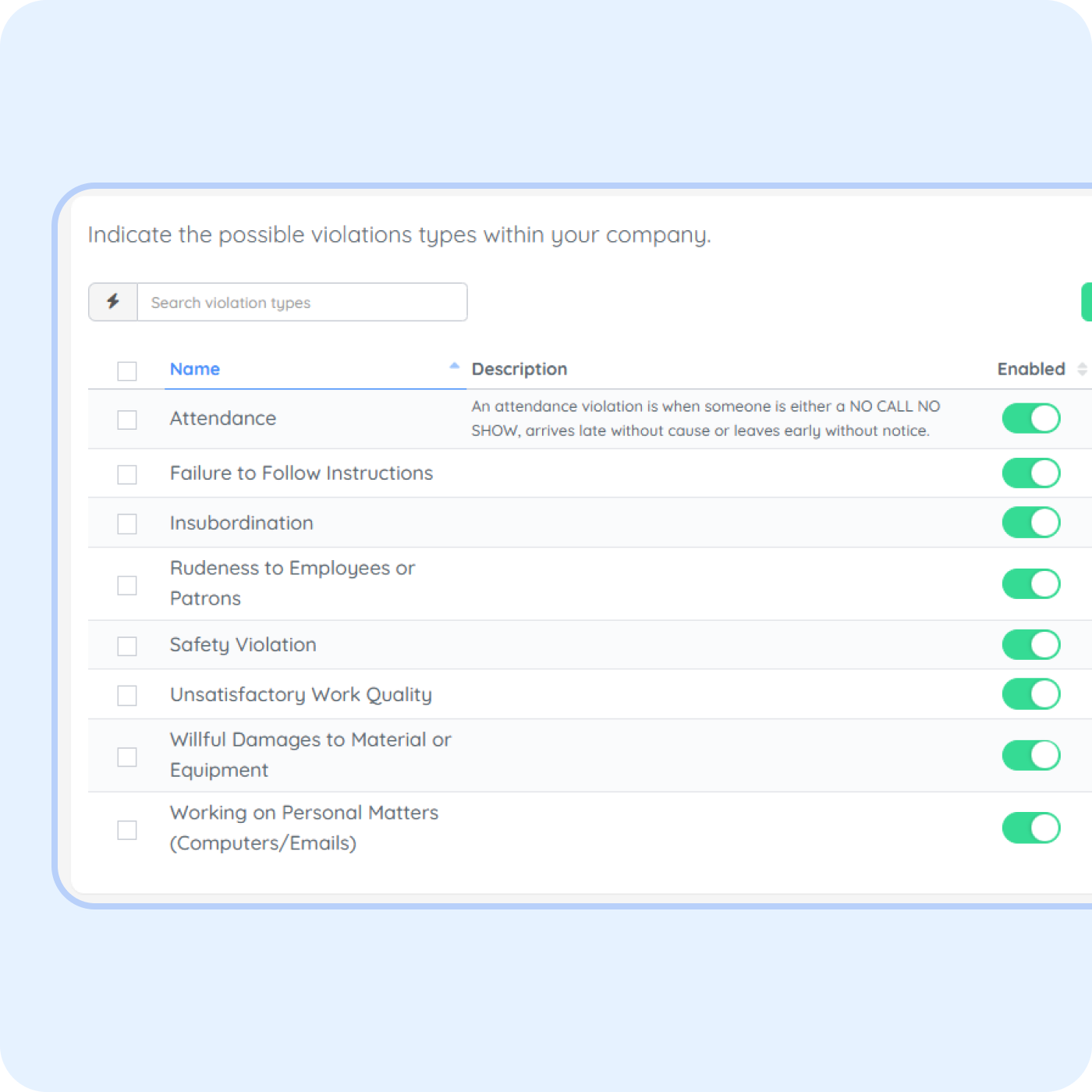
Configure your own violation types and actions to match how your company handles things.

Warnings and infraction tracking

Improved transparency for employee disciplinary action

Give managers a simple way to document infractions, and give HR a clear record of what happened, when, and how it was resolved. Every warning is captured with the same structure, signed by the employee, and stored where you can find it. Documentation stops being a scramble and becomes a source of truth you can act on.

  • Log warnings in a consistent, structured format across every manager

  • Capture category, severity, notes, and next steps on every record

  • Collect digital signatures as proof the employee acknowledged the warning

  • Store a full infraction history per employee, searchable in seconds

  • Give HR real-time visibility into every warning as it happens

  • Export warning reports to PDF or CSV for reviews, audits, or legal support

Employee warning management dashboard in PurelyHR showing disciplinary actions, approval status, electronic acknowledgments and compliance documentation

Effortless infractions documentation

Store all your employees’
warnings and infractions online!
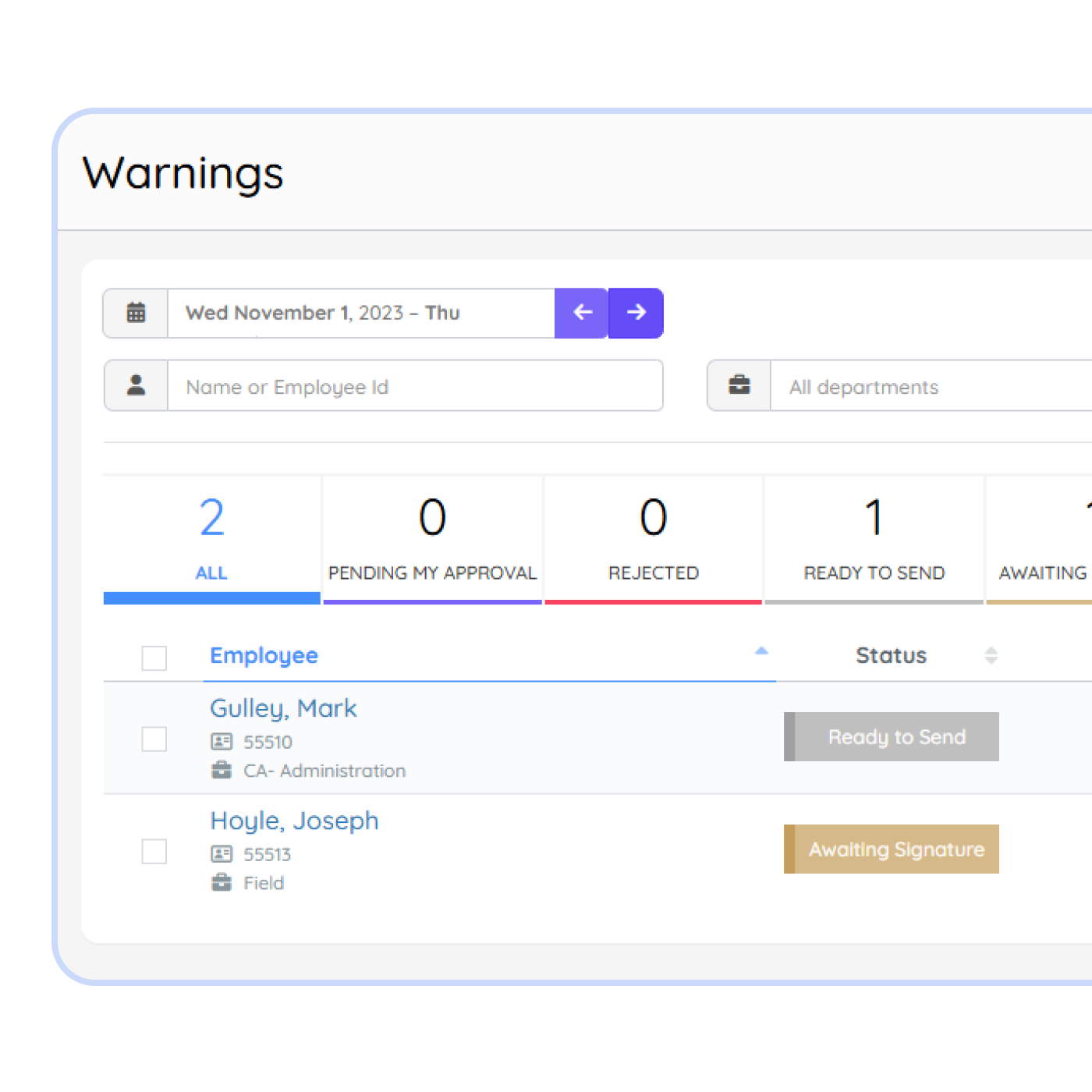
Document warnings in seconds, not spreadsheets

Give every manager a simple way to log infractions. Categories, severity, notes, and next steps get captured in one consistent format, so nothing gets lost in a folder or forgotten in a shared drive. One place for every warning, ready when you need it.

Employee disciplinary tracking settings in PurelyHR showing workplace violations, attendance infractions and policy enforcement categories
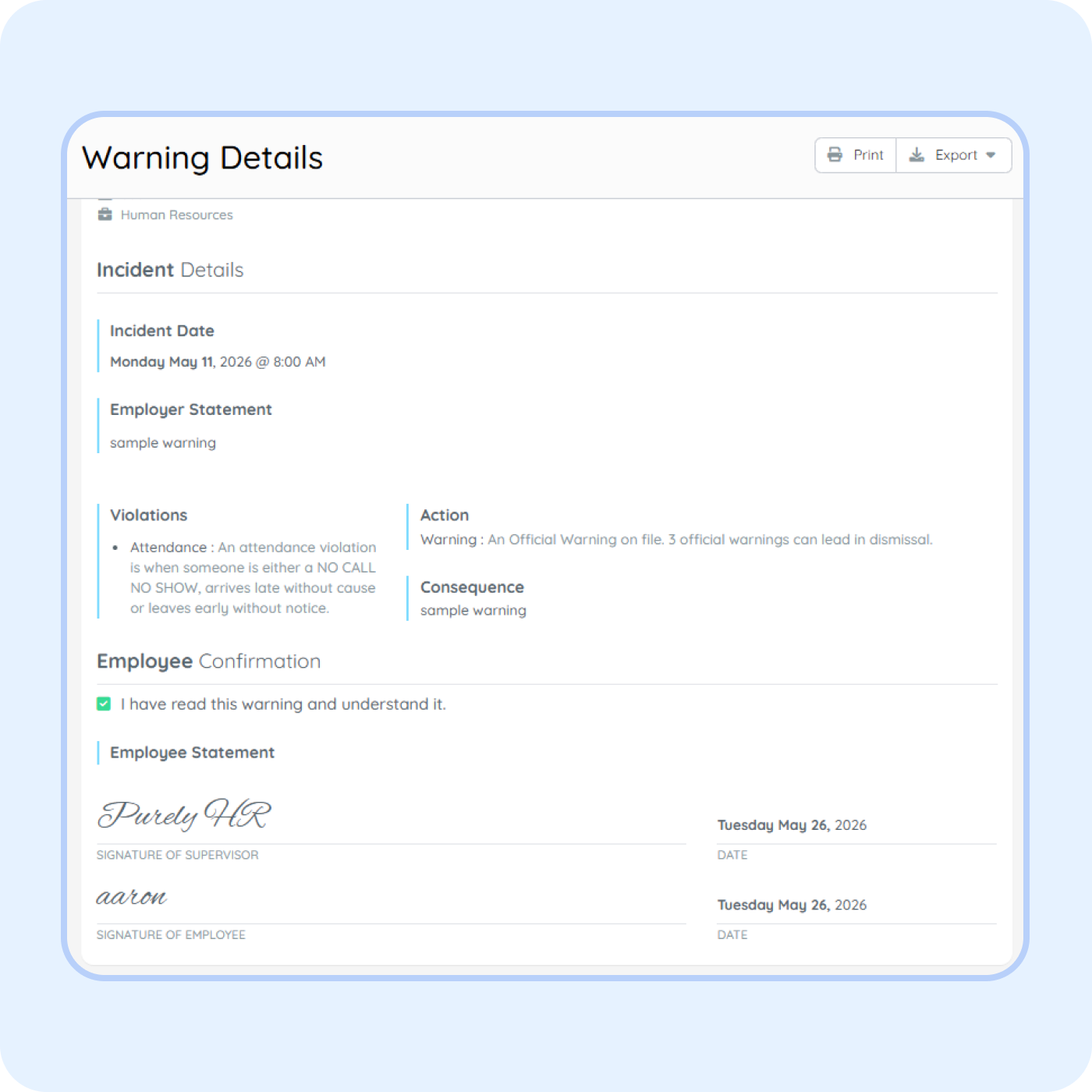
Employee warning details in PurelyHR showing workplace incident documentation, disciplinary action records and signed employee acknowledgments

Capture acknowledgement, with digital signatures

Stop guessing whether a warning was ever received. Employees review and sign every warning digitally, and the acknowledgement is timestamped and stored on the record. Managers stay accountable, employees know where they stand, and HR has proof when it counts.

A full infraction history, always at your fingertips

Every warning stays tied to the employee, searchable in seconds. Pull up someone’s full history before a review, an escalation, or a conversation with legal, and see exactly what happened, when, and what came next. No more digging through folders or old emails.
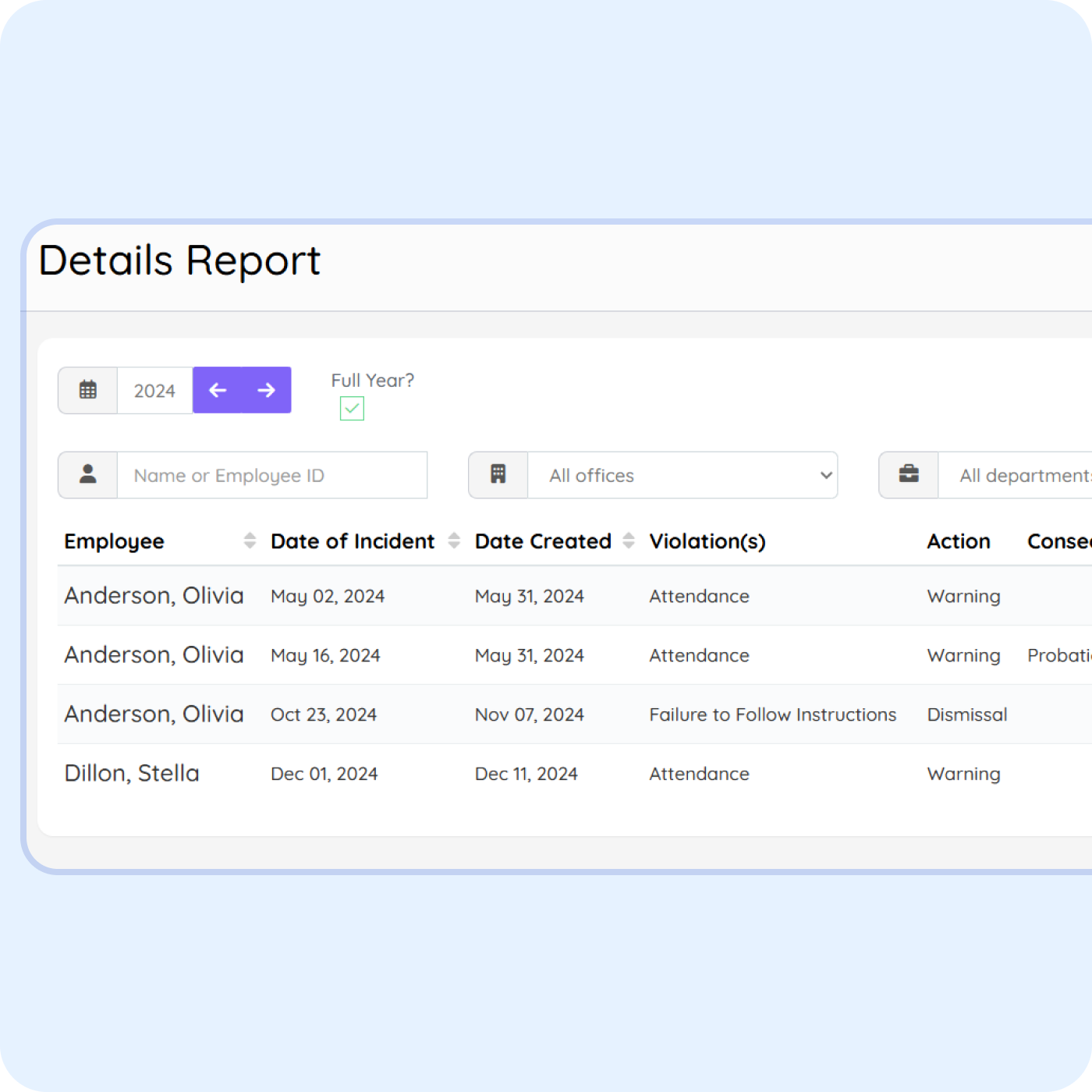
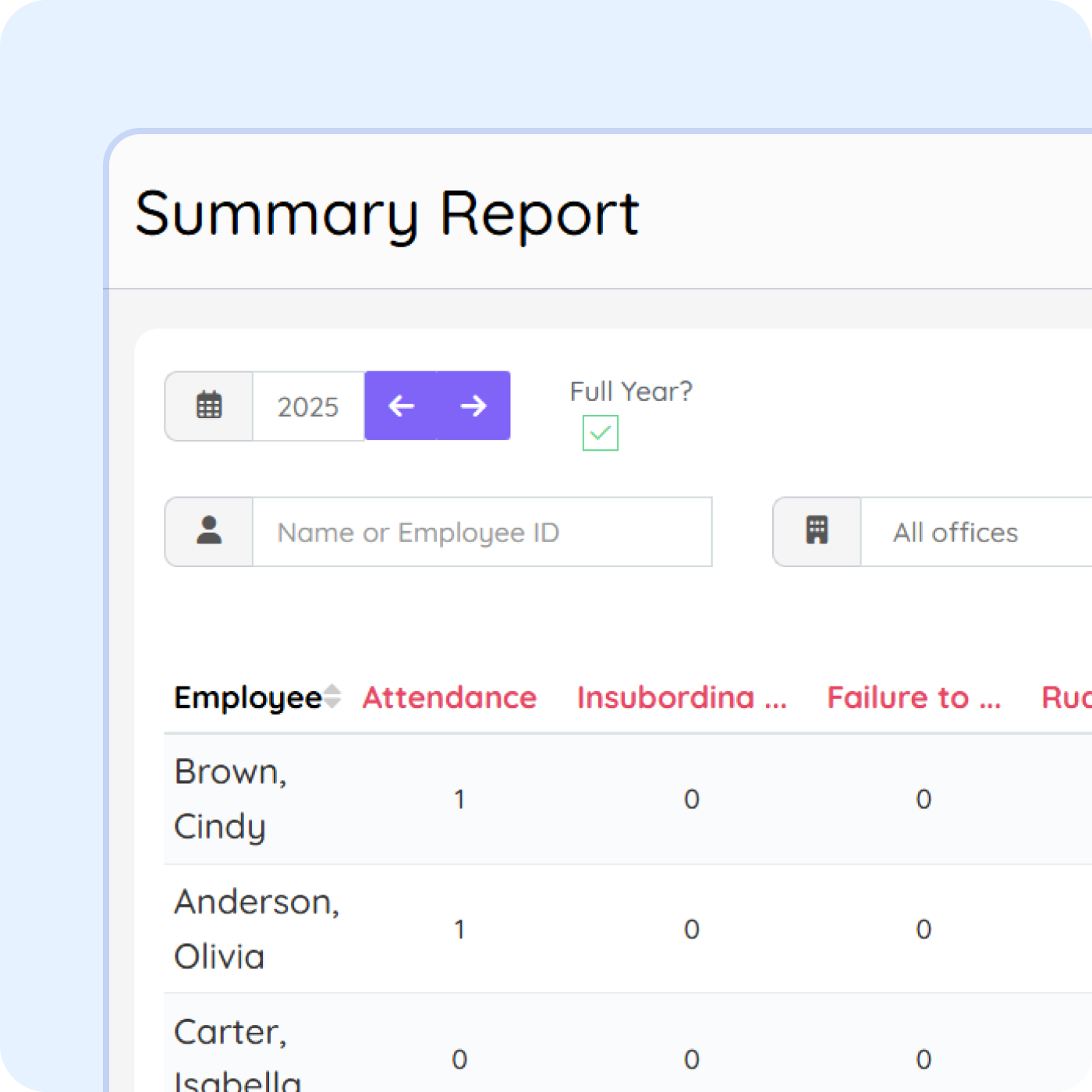
Employee disciplinary report in PurelyHR showing workplace violations, warning history, incident dates and compliance tracking
Employee disciplinary summary report in PurelyHR showing workplace violations, warning trends and compliance documentation metrics

Give HR real-time visibility, not surprises

HR stops finding out about issues after the fact. Every warning is visible the moment it is logged, so HR can spot patterns, support managers, and step in before small issues turn into big ones. One dashboard, full context, no back-channel updates.

Why teams choose PurelyHR

Better together

Pairs naturally with

Approved time off flows straight into the rest of PurelyHR, with no double entry.

PurelyHR Timesheet module for employee timesheet tracking, work hours reporting and payroll preparation

Time-Off

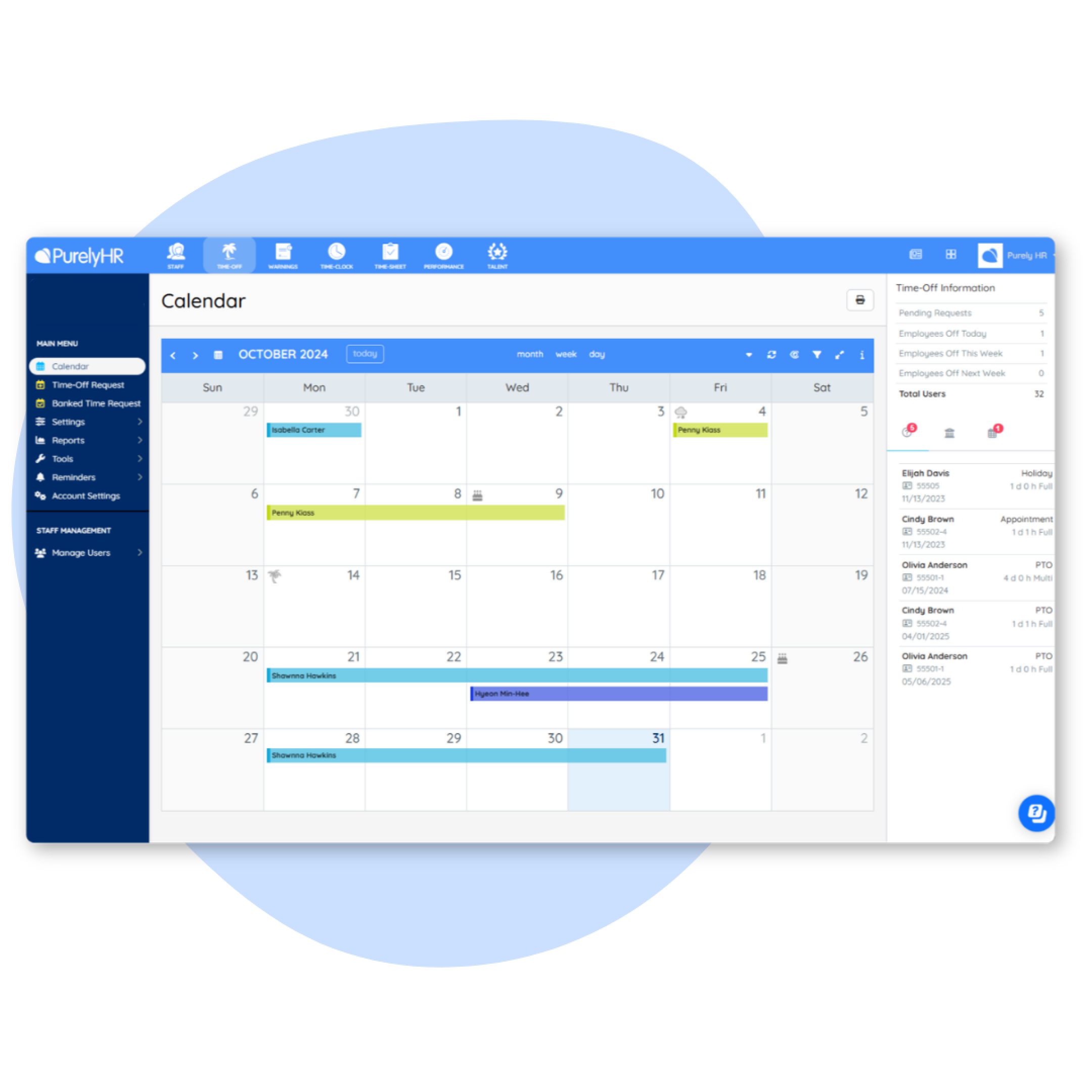
Leave manual calculations behind. Customize & automate policy changes, balance renewals & accruals. Approve requests in seconds & export powerful reports.

Employee leave calendar in PurelyHR showing vacation tracking, time off requests and absence management
PurelyHR Performance module for employee performance reviews, goal tracking and feedback management

Performance

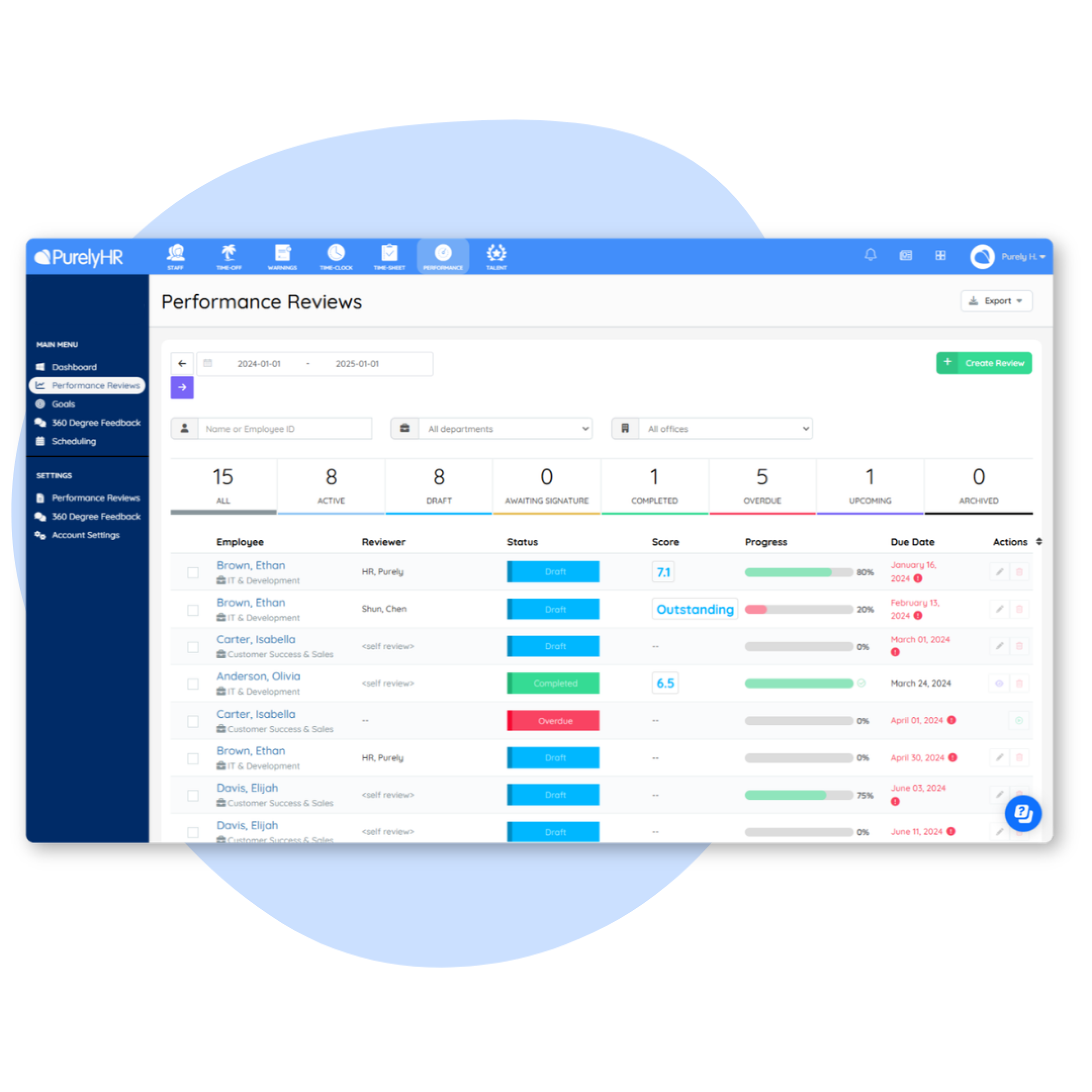
Your all-in-one performance management solution. With customizable templates, scheduling, goal-setting, feedback, and more.

PurelyHR performance management software displaying employee performance reviews, review progress, evaluation scores and due date tracking
PurelyHR Time Clock module for employee time tracking, clock in and clock out management

Time Clock

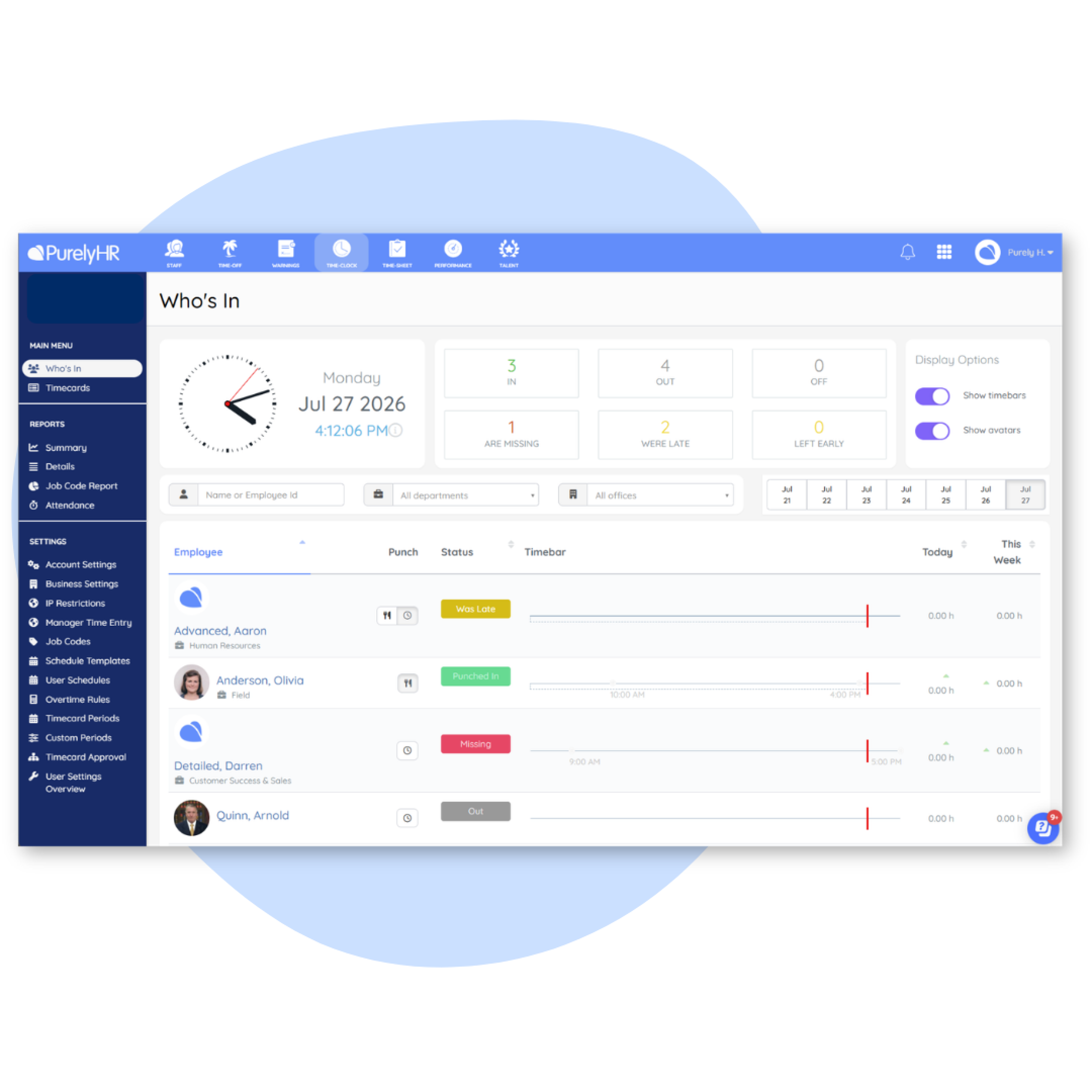
Clock in and out. Simple as that. Manage arrival and departure time, total hours worked, and get a real-time snapshot of who’s in and out of the office.

PurelyHR employee time clock software displaying real-time attendance tracking, employee punch status and workforce time management

The best leave & attendance tracking system for SMBs

Loved by users. Proven by experts.

Award-winning time tracking and leave management software for SMBs.
Rated 4.5+ stars across G2, Capterra, and Software Advice

PurelyHR awarded the G2 Best Relationship award for delivering exceptional customer support and small business HR software
PurelyHR recognized as a G2 High Performer in Canada for HR and workforce management software
PurelyHR recognized by G2 with the highest User Adoption award for small business HR software
PurelyHR recognized by G2 with the Most Implementable award for HR and workforce management software
PurelyHR recognized with a G2 Users Love Us milestone award for outstanding customer satisfaction and user reviews
PurelyHR recognized by G2 with the Easiest to Use award for small business HR software
PurelyHR recognized by G2 with the Best Usability award for small business HR software
PurelyHR awarded the Best Relationship award for delivering exceptional customer support and small business HR software
PurelyHR recognized as a G2 High Performer for HR software and leave management solutions
PurelyHR recognized as a Software Advice FrontRunners 2026 leader for HR and workforce management software
PurelyHR recognized on the Capterra Shortlist 2026 for HR and leave management software
PurelyHR recognized as a GetApp Category Leaders award winner for HR and workforce management software
Capterra 4.5 star rating recognizing PurelyHR for customer satisfaction, ease of use and leave management software
Software Advice 4.5 star rating recognizing PurelyHR for customer satisfaction, ease of use and HR software performance
GetApp user reviews rating of 4.5 out of 5 stars recognizing PurelyHR for customer satisfaction and Leave management software usability
G2 rating of 4.5 stars from 283 customer reviews recognizing PurelyHR for HR software, leave management and workforce management

Case studies

See how teams put PurelyHR to work

Teams, from nonprofits to universities, use PurelyHR to cut HR busywork.
Here are a few of their stories.

University of Toronto Logo

University of Toronto, MD Program

Simpler leave management at scale

The University of Toronto’s MD Program improved how it manages leave for a large academic team with PurelyHR.

University of Toronto customer success story showcasing how PurelyHR simplified employee leave management and absence tracking
Indigenous Perspectives Society customer logo

The Indigenous Perspectives Society (IPS)

A nonprofit saves
hours a week on leave management

Carol Itakura uses time-off transparency, automated calculations, and responsive support to simplify leave for her nonprofit team.

IPS customer success story showcasing how PurelyHR simplified employee leave management and HR administration
BRC Logo

Biodynamic Research Corp.

Saves 8 hours a week on PTO

BRC cut the manual hours it spent tracking paid time off, and now manages PTO in a fraction of the time.

BRC customer success story showcasing how PurelyHR simplified employee leave management and absence tracking

Security practices you can trust

We are committed to your data security

• SOC 2 Type 2 Compliant • ISO 27001 certified • Multi-factor authentication (MFA) • Single sign-on (SSO)
SOC 2 compliant HR software with security controls designed to protect employee data and business information
ISO 27001 certified HR software with secure information security management and data protection practices

Bring discipline records into one secure place

Stop chasing paper warnings and lost files. Document infractions fairly and keep every record online.
Try Warnings free for 21 days.

Free for 21 days · No credit card required · Cancel anytime

Learn more about us

Still have questions about PurelyHR?

Common questions about our time tracking, leave management, and HR software.

PurelyHR Warnings is an employee warning and documentation tool that helps organizations record workplace incidents, policy violations, performance concerns, attendance issues, and other employee-related matters in a consistent and organized way. HR teams and managers can create warning records, document the details of an incident, add supporting notes, and maintain a complete history within the employee’s profile.

By centralizing employee warnings in one secure location, businesses can improve accountability, support fair and consistent employee management practices, and maintain important HR documentation when handling disciplinary processes.

An employee warnings system helps small businesses create a consistent process for documenting workplace issues and employee infractions. Without a centralized system, important records can become scattered across emails, spreadsheets, paper files, or personal notes.

Using a warning tracking solution like PurelyHR Warnings allows managers to maintain accurate records, support performance conversations, document disciplinary actions, and establish a clear audit trail. This helps businesses reduce administrative effort, improve transparency, and ensure employee issues are documented consistently over time.

PurelyHR Warnings provides a structured way to document employee infractions, workplace incidents, attendance concerns, misconduct issues, policy violations, and other employee-related events. HR teams can record the incident details, add comments, capture relevant dates, and maintain documentation directly within the employee’s record.

Having a centralized record of employee warnings makes it easier to track repeat occurrences, review past incidents, and ensure workplace concerns are documented accurately and consistently across the organization.

Yes. PurelyHR Warnings includes electronic signature capabilities that allow employees to acknowledge and sign warning records digitally. This helps organizations streamline documentation processes by eliminating the need for paper forms and manual filing.

Digital signatures create a documented record that the employee has reviewed the warning, helping HR teams maintain organized records while supporting efficient communication between managers and employees.

PurelyHR Warnings helps organizations maintain detailed, organized, and consistent documentation of employee issues. By storing warnings, comments, dates, signatures, and supporting information in a centralized location, businesses can establish a documented history of employee-related events.

Consistent documentation supports fair HR processes, improves record keeping, and helps organizations demonstrate that workplace concerns have been tracked and managed through a standardized process.

PurelyHR Warnings allows organizations to document a variety of information related to employee issues and disciplinary actions. Depending on your process, warning records can include incident details, descriptions of the issue, warning dates, notes, comments, employee acknowledgements, signatures, and supporting documentation.

This flexibility allows businesses to create detailed records that accurately reflect workplace events while maintaining a complete history within the employee’s profile.

Managers and HR administrators can create warning records directly within PurelyHR Warnings by selecting an employee and entering the relevant details about the incident or concern. Information such as descriptions, notes, dates, and supporting documentation can be recorded as part of the warning.

Once entered, the warning becomes part of the employee’s documented history, making it easy to review previous records and maintain consistency across employee management processes.

Yes. PurelyHR Warnings allows organizations to attach supporting files and documentation to warning records. This can include documents, reports, screenshots, signed forms, or other relevant materials that help provide additional context for the warning.

Keeping supporting evidence together with the warning record helps HR teams maintain organized employee files, improve documentation practices, and ensure important information can be referenced whenever needed.